> ## Documentation Index
> Fetch the complete documentation index at: https://docs.lunarphp.com/llms.txt
> Use this file to discover all available pages before exploring further.
# Products
> Define, categorize, and manage products with variants, pricing, options, and associations.
Products are the core catalog model in Lunar, representing items available for sale with variants, pricing, and options.
## Overview
Products represent the items available for sale in a store. All custom attributes are defined against the product, and products can have multiple variations. In Lunar, a product always has at least one variant. When a product has only a single variant, the editing experience appears as though the product itself is being edited directly, but behind the scenes the data lives on the variant.
Every product belongs to a `ProductType`, which determines which attributes are available during editing. Products can also optionally belong to a `Brand`.
```php theme={null}
Lunar\Models\Product
```
### Fields
| Field | Type | Description |
| :---------------- | :--------------------- | :----------------------------------------- |
| `id` | `bigIncrements` | Primary key |
| `brand_id` | `foreignId` `nullable` | Optional brand association |
| `product_type_id` | `foreignId` | The product type |
| `status` | `string` | Product status (e.g. `published`, `draft`) |
| `attribute_data` | `json` `nullable` | Custom attribute data |
| `created_at` | `timestamp` | |
| `updated_at` | `timestamp` | |
| `deleted_at` | `timestamp` `nullable` | Soft deletes |
### Relationships
| Relationship | Type | Related Model | Description |
| :-------------------- | :------------- | :-------------------------------- | :----------------------------------------------------------------- |
| `productType` | BelongsTo | `Lunar\Models\ProductType` | The product's type |
| `brand` | BelongsTo | `Lunar\Models\Brand` | The product's brand |
| `variants` | HasMany | `Lunar\Models\ProductVariant` | All variants of the product |
| `variant` | HasOne | `Lunar\Models\ProductVariant` | Single variant convenience accessor |
| `prices` | HasManyThrough | `Lunar\Models\Price` | All prices across variants |
| `collections` | BelongsToMany | `Lunar\Models\Collection` | Pivot: `position` |
| `associations` | HasMany | `Lunar\Models\ProductAssociation` | Outgoing product associations |
| `inverseAssociations` | HasMany | `Lunar\Models\ProductAssociation` | Incoming product associations |
| `customerGroups` | BelongsToMany | `Lunar\Models\CustomerGroup` | Pivot: `purchasable`, `visible`, `enabled`, `starts_at`, `ends_at` |
| `channels` | MorphToMany | `Lunar\Models\Channel` | Pivot: `enabled`, `starts_at`, `ends_at` |
| `productOptions` | BelongsToMany | `Lunar\Models\ProductOption` | Pivot: `position` |
| `urls` | MorphMany | `Lunar\Models\Url` | SEO-friendly URLs |
| `tags` | MorphToMany | `Lunar\Models\Tag` | |
| `images` | MorphMany | Media | Product images |
| `thumbnail` | MorphOne | Media | Primary thumbnail image |
### Scopes
| Scope | Description |
| :------------------------------------------ | :---------------------------------- |
| `status($status)` | Filter by product status |
| `channel($channel, $startsAt, $endsAt)` | Filter by channel availability |
| `customerGroup($group, $startsAt, $endsAt)` | Filter by customer group visibility |
## Creating a Product
```php theme={null}
use Lunar\Models\Product;
use Lunar\FieldTypes\Text;
use Lunar\FieldTypes\TranslatedText;
Product::create([
'product_type_id' => $productType->id,
'status' => 'published',
'brand_id' => $brand->id,
'attribute_data' => [
'name' => new TranslatedText(collect([
'en' => new Text('FooBar'),
])),
'description' => new Text('This is a Foobar product.'),
],
]);
```
Lunar internally expects and uses the `name` attribute in product attribute data. It must be included in the product type's attributes and populated; otherwise the admin panel may throw unexpected errors.
### Filtering by status
```php theme={null}
use Lunar\Models\Product;
Product::status('published')->get();
```
## Channels
Products support multi-channel availability through the `HasChannels` trait. When a product is created, all channels are automatically synced. Each channel can be independently enabled or disabled, with optional start and end dates for scheduled availability.
### Scheduling a channel
```php theme={null}
// Enable for a channel immediately
$product->scheduleChannel($channel);
// Schedule availability to start in 14 days
$product->scheduleChannel($channel, now()->addDays(14));
// Accepts a collection of channels
$product->scheduleChannel(Channel::get());
```
### Filtering by channel
```php theme={null}
use Lunar\Models\Product;
$products = Product::channel($channel)->get();
```
## Customer Groups
Products can be assigned to customer groups with optional scheduling. This controls whether the product is visible and purchasable for members of each group.
### Scheduling a customer group
```php theme={null}
// Enable for this customer group immediately
$product->scheduleCustomerGroup($customerGroup);
// Schedule the product to be enabled in 14 days for this customer group
$product->scheduleCustomerGroup($customerGroup, now()->addDays(14));
// Accepts an array or collection of customer groups
$product->scheduleCustomerGroup(CustomerGroup::get());
```
### Filtering by customer group
The `customerGroup` scope accepts a single customer group (or ID), or a collection/array of customer groups or IDs.
```php theme={null}
use Lunar\Models\Product;
$products = Product::customerGroup(CustomerGroup::find(1))->paginate(50);
$products = Product::customerGroup([
$groupA,
$groupB,
])->paginate(50);
```
## Product Types
Product types categorize products and determine which attributes are available during editing (e.g. Television, T-Shirt, Book, Phone).
```php theme={null}
Lunar\Models\ProductType
```
### Fields
| Field | Type | Description |
| :----------- | :-------------- | :-------------------- |
| `id` | `bigIncrements` | Primary key |
| `name` | `string` | The product type name |
| `created_at` | `timestamp` | |
| `updated_at` | `timestamp` | |
### Relationships
| Relationship | Type | Related Model | Description |
| :------------------ | :---------- | :----------------------- | :--------------------------------- |
| `products` | HasMany | `Lunar\Models\Product` | All products of this type |
| `mappedAttributes` | MorphToMany | `Lunar\Models\Attribute` | All attributes mapped to this type |
| `productAttributes` | MorphToMany | `Lunar\Models\Attribute` | Attributes for products |
| `variantAttributes` | MorphToMany | `Lunar\Models\Attribute` | Attributes for variants |
### Creating a product type
```php theme={null}
use Lunar\Models\ProductType;
$productType = ProductType::create([
'name' => 'Boots',
]);
```
Product types have [Attributes](/1.x/reference/attributes) associated to them. These associated attributes determine which fields are available to products when editing. For example, an attribute of `Screen Type` associated to a `TVs` product type would make that field available on any product with that type.
Attributes can be associated using a standard [polymorphic relationship](https://laravel.com/docs/eloquent-relationships#many-to-many-polymorphic-relations):
```php theme={null}
$productType->mappedAttributes()->attach([/* attribute ids ... */]);
```
Both `Product` and `ProductVariant` attributes can be associated to a product type, and each will display on the corresponding model when editing.
Deleting an attribute will drop the association and could result in data loss.
### Retrieving the product type relationship
```php theme={null}
$product->productType;
$product->load(['productType']);
```
## Product Options
Product options define the different variations available for a product. Each `ProductOption` has a set of `ProductOptionValue` models. For example, a `ProductOption` called "Color" could have values like "Blue", "Red", and "Green".
Product options and product option values are defined at a system level and are translatable.
### Creating a ProductOption
```php theme={null}
use Lunar\Models\ProductOption;
$option = ProductOption::create([
'name' => [
'en' => 'Color',
'fr' => 'Couleur',
],
'label' => [
'en' => 'Color',
'fr' => 'Couleur',
],
]);
```
Values can then be created for the option:
```php theme={null}
// Lunar\Models\ProductOptionValue
$option->values()->createMany([
[
'name' => [
'en' => 'Blue',
'fr' => 'Bleu',
],
],
[
'name' => [
'en' => 'Red',
'fr' => 'Rouge',
],
],
]);
```
This product option and its values are now ready to be used with product variants.
### Product Option Meta
Both `ProductOption` and `ProductOptionValue` models include a `meta` field for storing custom information such as color hex values, image links, or other display data.
Lunar makes no assumptions about the structure of the `meta` JSON field. Any values can be stored in whatever format the application requires.
## Product Associations
Products can be associated with other products as cross-sells, up-sells, or alternates. See the [Associations](/1.x/reference/associations) reference for full details on creating and managing product associations.
## Variants
Variants represent the different purchasable permutations of a product, such as "Small Blue T-shirt" or "Size 9 Leather Boots". The product acts as the parent, and variants hold the specific data including pricing, inventory, shipping information, and product identifiers.
A product always has at least one variant. When additional variants are generated, Lunar uses the first variant as a baseline for pricing, inventory, and other data.
```php theme={null}
Lunar\Models\ProductVariant
```
### Fields
| Field | Type | Description |
| :------------------- | :------------------------- | :------------------------------------------------------------- |
| `id` | `bigIncrements` | Primary key |
| `product_id` | `foreignId` | The parent product |
| `tax_class_id` | `foreignId` | Tax classification |
| `tax_ref` | `string` `nullable` | Tax reference identifier |
| `unit_quantity` | `integer` | Units per single purchase, default: `1` |
| `min_quantity` | `integer` | Minimum purchasable quantity, default: `1` |
| `quantity_increment` | `integer` | Purchase quantity step, default: `1` |
| `sku` | `string` `nullable` | Stock keeping unit |
| `gtin` | `string` `nullable` | Global Trade Item Number |
| `mpn` | `string` `nullable` | Manufacturer Part Number |
| `ean` | `string` `nullable` | European Article Number |
| `length_value` | `decimal(10,4)` `nullable` | Length dimension |
| `length_unit` | `string` `nullable` | Length unit of measure |
| `width_value` | `decimal(10,4)` `nullable` | Width dimension |
| `width_unit` | `string` `nullable` | Width unit of measure |
| `height_value` | `decimal(10,4)` `nullable` | Height dimension |
| `height_unit` | `string` `nullable` | Height unit of measure |
| `weight_value` | `decimal(10,4)` `nullable` | Weight value |
| `weight_unit` | `string` `nullable` | Weight unit of measure |
| `volume_value` | `decimal(10,4)` `nullable` | Volume value |
| `volume_unit` | `string` `nullable` | Volume unit of measure |
| `shippable` | `boolean` | Whether the variant requires shipping, default: `true` |
| `stock` | `integer` | Current stock quantity, default: `0` |
| `backorder` | `integer` | Backorder quantity, default: `0` |
| `purchasable` | `string` | Purchasability mode: `always` or `in_stock`, default: `always` |
| `attribute_data` | `json` `nullable` | Custom attribute data |
| `created_at` | `timestamp` | |
| `updated_at` | `timestamp` | |
| `deleted_at` | `timestamp` `nullable` | Soft deletes |
### Product Identifiers
Each variant can store product identifiers for use in internal systems or external services.
**SKU** (Stock Keeping Unit) — A code (usually eight alphanumeric digits) used to track stock levels internally. Each variant of a product typically has a unique SKU.
**GTIN** (Global Trade Item Number) — An internationally recognized product identifier, often accompanying a barcode. Useful with services like Google Shopping to help classify products.
**MPN** (Manufacturer Part Number) — An identifier from the manufacturer that differentiates a product among similar items from the same brand.
**EAN** (European Article Number) — A series of characters that identifies specific products within an inventory system.
### Creating Variants
A product variant requires a product, currency (for pricing), and a tax class.
```php theme={null}
use Lunar\Models\Product;
use Lunar\Models\ProductVariant;
use Lunar\Models\TaxClass;
use Lunar\Models\Currency;
$product = Product::where(...)->first();
$taxClass = TaxClass::where(...)->first();
$currency = Currency::where(...)->first();
```
Create the product option and its values:
```php theme={null}
use Lunar\Models\ProductOption;
$option = ProductOption::create([
'name' => [
'en' => 'Color',
],
'label' => [
'en' => 'Color',
],
]);
$blueOption = $option->values()->create([
'name' => [
'en' => 'Blue',
],
]);
$redOption = $option->values()->create([
'name' => [
'en' => 'Red',
],
]);
```
Create the variants and attach their option values:
```php theme={null}
$blueVariant = ProductVariant::create([
'product_id' => $product->id,
'tax_class_id' => $taxClass->id,
'sku' => 'blue-product',
]);
$blueVariant->values()->attach($blueOption);
$redVariant = ProductVariant::create([
'product_id' => $product->id,
'tax_class_id' => $taxClass->id,
'sku' => 'red-product',
]);
$redVariant->values()->attach($redOption);
```
Then create pricing for each variant:
```php theme={null}
$blueVariant->prices()->create([
'price' => 199,
'currency_id' => $currency->id,
]);
$redVariant->prices()->create([
'price' => 199,
'currency_id' => $currency->id,
]);
```
### Exceptions
| Exception | Conditions |
| :------------------------------------------ | :---------------------------------------------------- |
| `Illuminate\Validation\ValidationException` | Thrown if validation fails on the value options array |
## Shipping
By default, all product variants are marked as shippable. To mark a variant as non-shippable:
```php theme={null}
$variant->update([
'shippable' => false,
]);
```
### Dimensions
Products can store dimension data on each variant. The available dimensions are:
* Length
* Width
* Height
* Weight
* Volume
For handling unit conversions, Lunar uses the [Cartalyst Converter](https://github.com/cartalyst/converter) package, which supports a wide range of units of measure.
Each dimension has a corresponding `_value` and `_unit` column in the database:
```php theme={null}
$variant->length_value;
$variant->length_unit;
$variant->width_value;
$variant->width_unit;
// etc.
```
### Configuring measurements
Available units of measure can be configured in the `lunar/shipping.php` config file. The defaults include:
**Length:** m, mm, cm, ft, in
**Weight:** kg, g, lbs
**Volume:** l, ml, gal, floz
### Getting and converting measurement values
The raw `*_value` and `*_unit` values can be accessed directly, but Lunar also provides an accessor for each dimension that supports conversion:
```php theme={null}
$variant->length->to('length.ft')->convert();
```
#### Volume calculation
Volume can be calculated automatically from the length, width, and height dimensions, or set manually:
```php theme={null}
$variant->update([
'length_value' => 50,
'length_unit' => 'mm',
'height_value' => 50,
'height_unit' => 'mm',
'width_value' => 50,
'width_unit' => 'mm',
]);
// Returns ml by default
$variant->volume->getValue(); // 125.0
// Convert to any supported volume unit
$variant->volume->to('volume.l')->convert()->getValue(); // 0.125
// Setting a manual volume overrides the automatic calculation
$variant->update([
'volume_unit' => 'floz',
'volume_value' => 100,
]);
$variant->volume->getValue(); // 100
$variant->volume->to('volume.l')->convert()->getValue(); // 2.95735...
```
**Formatted values**
```php theme={null}
$variant->length->to('length.cm')->convert()->format(); // 50cm
```
## Pricing
### Overview
Prices are stored in the database as integers. When retrieving a `Price` model, the `price` and `compare_price` attributes are cast to a `Price` datatype with useful helpers for display.
| Field | Description | Default | Required |
| :------------------ | :---------------------------------------------------------------- | :------ | :------- |
| `price` | An integer value for the price | `null` | yes |
| `compare_price` | A comparison price for display purposes (e.g. RRP) | `null` | no |
| `currency_id` | The ID of the related currency | `null` | yes |
| `min_quantity` | The minimum quantity required to get this price | `1` | no |
| `customer_group_id` | The customer group this price applies to; `null` means all groups | `null` | no |
| `priceable_type` | The class reference to the related model that owns the price | `null` | yes |
| `priceable_id` | The ID of the related model that owns the price | `null` | yes |
```php theme={null}
use Lunar\Models\ProductVariant;
use Lunar\Models\Price;
$priceable = ProductVariant::create([/* ... */]);
Price::create([
'price' => 199,
'compare_price' => 299,
'currency_id' => 1,
'min_quantity' => 1,
'customer_group_id' => null,
'priceable_type' => $priceable->getMorphClass(),
'priceable_id' => $priceable->id,
]);
```
For full details on price formatting, see the [Pricing Reference](/1.x/reference/pricing).
The same formatting methods apply to the `compare_price` attribute.
### Base Pricing
Pricing is defined at the variant level, meaning each variant has its own price for each currency. Prices can be created directly or through the relationship:
```php theme={null}
use Lunar\Models\ProductVariant;
use Lunar\Models\Price;
$priceable = ProductVariant::create([/* ... */]);
Price::create([
'price' => 199,
'compare_price' => 299,
'currency_id' => 1,
'min_quantity' => 1,
'customer_group_id' => null,
'priceable_type' => $priceable->getMorphClass(),
'priceable_id' => $priceable->id,
]);
// Or via the relationship
$variant->prices()->create([/* ... */]);
```
### Customer Group Pricing
Setting the `customer_group_id` column controls which customer group a price applies to. When left as `null`, the price applies to all customer groups. This allows different pricing and quantity breaks per customer group.
### Price Breaks
Price breaks adjust the unit price based on purchase quantity. The `min_quantity` column determines when each price tier applies:
```php theme={null}
use Lunar\Models\Price;
Price::create([
// ...
'price' => 199,
'compare_price' => 399,
'min_quantity' => 1,
]);
Price::create([
// ...
'price' => 150,
'compare_price' => 399,
'min_quantity' => 10,
]);
```
In the above example, ordering 1–9 items costs 1.99 per item, while ordering 10 or more costs 1.50 per item.
### Fetching Prices
The `PricingManager` facade provides a fluent API for retrieving the correct price based on various criteria.
#### Minimum example
A quantity of 1 is implied when not passed.
```php theme={null}
$pricing = \Lunar\Facades\Pricing::for($variant)->get();
```
#### With quantities
```php theme={null}
$pricing = \Lunar\Facades\Pricing::qty(5)->for($variant)->get();
```
#### With customer groups
If no customer group is passed, Lunar uses the default group and includes pricing that is not specific to any group.
```php theme={null}
$pricing = \Lunar\Facades\Pricing::customerGroups($groups)->for($variant)->get();
// Or a single customer group
$pricing = \Lunar\Facades\Pricing::customerGroup($group)->for($variant)->get();
```
#### For a specific user
The `PricingManager` assumes the current authenticated user by default.
```php theme={null}
// Always return the guest price
$pricing = \Lunar\Facades\Pricing::guest()->for($variant)->get();
// Specify a different user
$pricing = \Lunar\Facades\Pricing::user($user)->for($variant)->get();
```
#### With a specific currency
If no currency is passed, the default currency is used.
```php theme={null}
$pricing = \Lunar\Facades\Pricing::currency($currency)->for($variant)->get();
```
#### From a model
Any model using the `HasPrices` trait (such as `ProductVariant`) exposes a `pricing()` method:
```php theme={null}
$pricing = $variant->pricing()->qty(5)->get();
```
Fetching a price for a currency that has no pricing defined will throw a `Lunar\Exceptions\MissingCurrencyPriceException`.
***
The `get()` method returns a `PricingResponse` object. Unless noted as a collection, each property returns a `Lunar\Models\Price` object.
```php theme={null}
// The price that matched the given criteria
$pricing->matched;
// The base price associated with the variant
$pricing->base;
// A collection of all price quantity breaks for the given criteria
$pricing->priceBreaks;
// All customer group pricing for the given criteria
$pricing->customerGroupPrices;
```
To retrieve all prices across a product's variants without loading the variants individually, use the `prices` relationship on the product:
```php theme={null}
$product->prices;
```
### Storing Prices Inclusive of Tax
Lunar supports storing pricing inclusive of tax, which is useful for charm pricing (e.g. \$9.99) that may not be achievable when storing prices exclusive of tax due to rounding.
To enable this, set the `stored_inclusive_of_tax` config value in `lunar/pricing` to `true` and ensure the default tax zone is configured with the correct tax rates. The cart will then automatically calculate tax correctly.
To display both tax-inclusive and tax-exclusive prices on product pages:
```php theme={null}
$price->priceIncTax();
$price->priceExTax();
$price->comparePriceIncTax();
```
### Customizing Prices with Pipelines
Pricing pipelines are defined in `config/lunar/pricing.php`:
```php theme={null}
'pipelines' => [
//
],
```
Custom pipelines can modify pricing during resolution:
```php theme={null}
pricing->matched;
$matchedPrice->price->value = 200;
$pricingManager->pricing->matched = $matchedPrice;
return $next($pricingManager);
}
}
```
```php theme={null}
'pipelines' => [
// ...
App\Pipelines\Pricing\CustomPricingPipeline::class,
],
```
Pipelines run from top to bottom.
## Full Example
This example walks through creating a pair of Dr. Martens boots with multiple size and color variants.
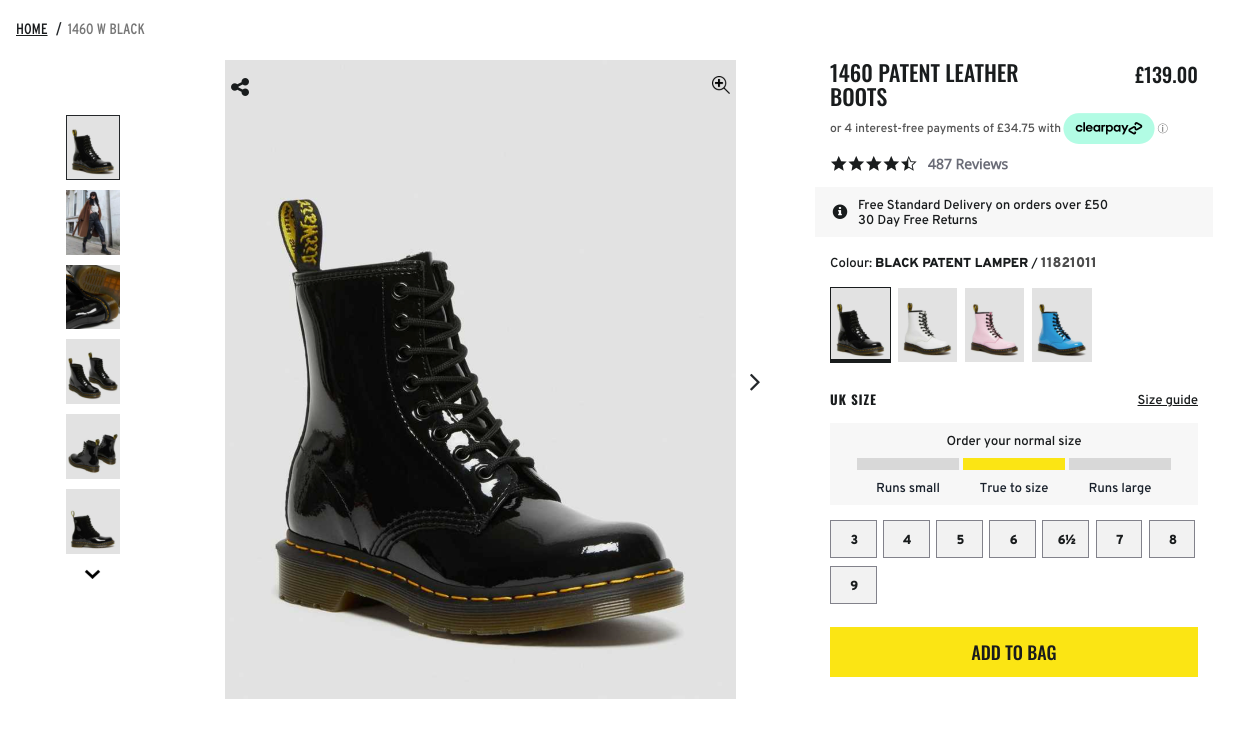 The steps involved are:
* Create the product type
* Create the initial product
* Create product options and their values
* Create the variants
### Set up the product type
```php theme={null}
use Lunar\Models\ProductType;
$productType = ProductType::create([
'name' => 'Boots',
]);
```
This example assumes attributes for name and description already exist and are assigned to the product type.
### Create the initial product
```php theme={null}
use Lunar\Models\Product;
use Lunar\FieldTypes\Text;
use Lunar\FieldTypes\TranslatedText;
$product = Product::create([
'product_type_id' => $productType->id,
'status' => 'published',
'brand_id' => $brandId,
'attribute_data' => [
'name' => new TranslatedText(collect([
'en' => new Text('1460 PATENT LEATHER BOOTS'),
])),
'description' => new Text('Even more shades from the archive...'),
],
]);
```
### Create product options
Based on the example above, two options are needed: Size and Color.
```php theme={null}
use Lunar\Models\ProductOption;
$color = ProductOption::create([
'name' => [
'en' => 'Color',
],
'label' => [
'en' => 'Color',
],
]);
$size = ProductOption::create([
'name' => [
'en' => 'Size',
],
'label' => [
'en' => 'Size',
],
]);
```
### Create product option values
```php theme={null}
$color->values()->createMany([
[
'name' => [
'en' => 'Black',
],
],
[
'name' => [
'en' => 'White',
],
],
[
'name' => [
'en' => 'Pale Pink',
],
],
[
'name' => [
'en' => 'Mid Blue',
],
],
]);
$size->values()->createMany([
[
'name' => [
'en' => '3',
],
],
[
'name' => [
'en' => '6',
],
],
]);
```
### Create the variants
With the options and values defined, variants can be created for each combination. Each variant needs a product, tax class, SKU, and at least one price.
```php theme={null}
use Lunar\Models\ProductVariant;
use Lunar\Models\TaxClass;
use Lunar\Models\Currency;
$taxClass = TaxClass::first();
$currency = Currency::first();
$count = 0;
foreach ($color->values as $colorValue) {
foreach ($size->values as $sizeValue) {
$count++;
$variant = ProductVariant::create([
'product_id' => $product->id,
'tax_class_id' => $taxClass->id,
'sku' => "DRBOOT-{$count}",
]);
$variant->values()->attach([$colorValue->id, $sizeValue->id]);
$variant->prices()->create([
'price' => 16900,
'currency_id' => $currency->id,
]);
}
}
```
The resulting variants:
| SKU | Color | Size |
| :------- | :-------- | :--- |
| DRBOOT-1 | Black | 3 |
| DRBOOT-2 | Black | 6 |
| DRBOOT-3 | White | 3 |
| DRBOOT-4 | White | 6 |
| DRBOOT-5 | Pale Pink | 3 |
| DRBOOT-6 | Pale Pink | 6 |
| DRBOOT-7 | Mid Blue | 3 |
| DRBOOT-8 | Mid Blue | 6 |
SKUs, pricing, and other variant details can be adjusted as needed before publishing.
The steps involved are:
* Create the product type
* Create the initial product
* Create product options and their values
* Create the variants
### Set up the product type
```php theme={null}
use Lunar\Models\ProductType;
$productType = ProductType::create([
'name' => 'Boots',
]);
```
This example assumes attributes for name and description already exist and are assigned to the product type.
### Create the initial product
```php theme={null}
use Lunar\Models\Product;
use Lunar\FieldTypes\Text;
use Lunar\FieldTypes\TranslatedText;
$product = Product::create([
'product_type_id' => $productType->id,
'status' => 'published',
'brand_id' => $brandId,
'attribute_data' => [
'name' => new TranslatedText(collect([
'en' => new Text('1460 PATENT LEATHER BOOTS'),
])),
'description' => new Text('Even more shades from the archive...'),
],
]);
```
### Create product options
Based on the example above, two options are needed: Size and Color.
```php theme={null}
use Lunar\Models\ProductOption;
$color = ProductOption::create([
'name' => [
'en' => 'Color',
],
'label' => [
'en' => 'Color',
],
]);
$size = ProductOption::create([
'name' => [
'en' => 'Size',
],
'label' => [
'en' => 'Size',
],
]);
```
### Create product option values
```php theme={null}
$color->values()->createMany([
[
'name' => [
'en' => 'Black',
],
],
[
'name' => [
'en' => 'White',
],
],
[
'name' => [
'en' => 'Pale Pink',
],
],
[
'name' => [
'en' => 'Mid Blue',
],
],
]);
$size->values()->createMany([
[
'name' => [
'en' => '3',
],
],
[
'name' => [
'en' => '6',
],
],
]);
```
### Create the variants
With the options and values defined, variants can be created for each combination. Each variant needs a product, tax class, SKU, and at least one price.
```php theme={null}
use Lunar\Models\ProductVariant;
use Lunar\Models\TaxClass;
use Lunar\Models\Currency;
$taxClass = TaxClass::first();
$currency = Currency::first();
$count = 0;
foreach ($color->values as $colorValue) {
foreach ($size->values as $sizeValue) {
$count++;
$variant = ProductVariant::create([
'product_id' => $product->id,
'tax_class_id' => $taxClass->id,
'sku' => "DRBOOT-{$count}",
]);
$variant->values()->attach([$colorValue->id, $sizeValue->id]);
$variant->prices()->create([
'price' => 16900,
'currency_id' => $currency->id,
]);
}
}
```
The resulting variants:
| SKU | Color | Size |
| :------- | :-------- | :--- |
| DRBOOT-1 | Black | 3 |
| DRBOOT-2 | Black | 6 |
| DRBOOT-3 | White | 3 |
| DRBOOT-4 | White | 6 |
| DRBOOT-5 | Pale Pink | 3 |
| DRBOOT-6 | Pale Pink | 6 |
| DRBOOT-7 | Mid Blue | 3 |
| DRBOOT-8 | Mid Blue | 6 |
SKUs, pricing, and other variant details can be adjusted as needed before publishing.